
# ESLint 使用
可组装的JavaScript和JSX检查工具官方传送门 (opens new window)
# 创建项目
# 1. 创建一个项目
vue create demo
# 2. 创建vue2版本的项目
# 3. 选择了 Linter/Formatter
# 4. 选择了 ESLint + standard config 标准版
# 5. 独立文件存放
# 6. 项目创建完成

# 7. 在创建的项目中 可以看见 .eslintrc.js 文件
1
2
3
4
5
6
7
8
9
2
3
4
5
6
7
8
9
# 项目中存在 .eslintrc.js 文件夹
// 刚刚新建的项目 存在的内容
module.exports = {
  root: true,
  env: {
    node: true
  },
  extends: [
    'plugin:vue/essential',
    '@vue/standard'
  ],
  parserOptions: {
    parser: '@babel/eslint-parser'
  },
  rules: {
    'no-console': process.env.NODE_ENV === 'production' ? 'warn' : 'off',
    'no-debugger': process.env.NODE_ENV === 'production' ? 'warn' : 'off',
    // 比如 以下是自己自定义的规则
    // 关闭了 方法括号前的空格
    "space-before-function-paren": ["error", { "anonymous": "always", "named": "never", "asyncArrow": "always", }],
    // 关闭了 没有使用变量的检测
    'no-unused-vars': 'off',
    // 关闭了 未声明的变量的检测
    'no-undef': 'off'
  }
}
// 想要看 rules - no-console 的意思
// 可以去 官网 - 用户指南 - 规则 看一下具体什么意思
1
2
3
4
5
6
7
8
9
10
11
12
13
14
15
16
17
18
19
20
21
22
23
24
25
26
27
2
3
4
5
6
7
8
9
10
11
12
13
14
15
16
17
18
19
20
21
22
23
24
25
26
27
# 配置VSCode
- 插件 安装这两个插件来辅助 : ESLint 和 Prettier-Code formatter


Prettier官方传送门 (opens new window)
- 打开settings.json文件
(1) 配置VSCode 打开设置 - 右上角打开设置(json) - 打开settings.json文件
(2) 或者可以 ctrl + shift + p, 所有 open Settings ,首选项:打开设置(json)点击就是
方式1: .prettierrc 文件引入
// .prettierrc 创建 此文件 放在对应的目录下(settings.json prettier.configPath路径对应就好 )
{
    "semi": false,
    "singleQuote": true,
    "bracketSpacing": true
}
1
2
3
4
5
6
2
3
4
5
6
// settings.json 添加的配置
// 在这个文件中 引入就好
"prettier.configPath": "C:\\Users\\ziji\\.prettierrc",
1
2
3
2
3
方式2: settings.json直接配置
// settings.json 添加的配置
  // 安装Prettier配置
  "eslint.alwaysShowStatus": true,
  // 函数后面不加逗号
  "prettier.trailingComma": "none",
  // 句尾是否加分号 true是加
  "prettier.semi": false,
  // 每行文字个数超出此限制将会被迫换行
  "prettier.printWidth": 300,
  // 使用单引号替换双引号
  "prettier.singleQuote": true,
  //  (x) => {} 箭头函数参数只有一个时是否要有小括号。avoid:省略括号
  "prettier.arrowParens": "avoid",
  // 设置 .vue 文件中,HTML代码的格式化插件
  "vetur.format.defaultFormatter.html": "js-beautify-html",
  "vetur.ignoreProjectWarning": true,
  "vetur.format.defaultFormatterOptions": {
    "prettier": {
      // 函数后面不加逗号,
      "trailingComma": "none",
      // 使用单引号
      "singleQuote": true,
      // 结尾不用分号
      "semi": false,
      "arrowParens": "avoid",
      "printWidth": 300
    },
    "js-beautify-html": {
      "wrap_attributes": false
    },
  },
1
2
3
4
5
6
7
8
9
10
11
12
13
14
15
16
17
18
19
20
21
22
23
24
25
26
27
28
29
30
31
2
3
4
5
6
7
8
9
10
11
12
13
14
15
16
17
18
19
20
21
22
23
24
25
26
27
28
29
30
31
方式3:
在根目录下 新建.prettierrc.js文件(和.eslintrc.js同级)
//.prettierrc.js
module.exports = {
  // 每行文字个数超出此限制将会被迫换行
  "printWidth": 300,
  // 使用 2 个空格缩进
  "tabWidth": 2,
  // 不使用缩进符,而使用空格
  "useTabs": false,
  // 句尾是否加分号 true是加
  "semi": false,
  // 使用单引号
  "singleQuote": true,
  // 行尾逗号,默认none,可选 none|es5|all
  // es5 包括es5中的数组、对象
  // all 包括函数对象等所有可选
  "trailingComma": "none",
  //  (x) => {} 箭头函数参数只有一个时是否要有小括号。avoid:省略括号、always是加上
  "arrowParens": "avoid",
  // 大括号内的首尾需要空格  "{ foo: bar }"
  "bracketSpacing": true,
  // 使用默认的折行标准,因为使用了一些折行敏感型的渲染器(如GitHub comment)而按照markdown文本样式进行折行
  "proseWrap": "preserve",
  // 根据xxx决定 html 要不要折行,有人这里写css
  "htmlWhitespaceSensitivity": "ignore",
  // 不使用prettier格式化的文件填写在项目的.prettierignore文件中
  "ignorePath": ".prettierignore",
  // jsx 标签的反尖括号需要换行: 把'>' 单独放一行
  // JSX标签闭合位置 默认false
  // false: <div
  //          className=""
  //          style={{}}
  //       >
  // true: <div
  //          className=""
  //          style={{}} >
  "bracketSameLine": false,
  // jsx 不使用单引号,而使用双引号
  "jsxSingleQuote": false,
  // 不格式化vue文件,vue文件的格式化单独设置
  // "prettier.disableLanguages": ["vue"],
  // 不让prettier使用eslint的代码格式进行校验
  // "eslintIntegration": false,
  // 不让prettier使用stylelint的代码格式进行校验
  // "stylelintIntegration": false,

}
1
2
3
4
5
6
7
8
9
10
11
12
13
14
15
16
17
18
19
20
21
22
23
24
25
26
27
28
29
30
31
32
33
34
35
36
37
38
39
40
41
42
43
44
45
46
2
3
4
5
6
7
8
9
10
11
12
13
14
15
16
17
18
19
20
21
22
23
24
25
26
27
28
29
30
31
32
33
34
35
36
37
38
39
40
41
42
43
44
45
46
(3)上述两个文件配置好后,配置格式化文档的方式
比如自己前端,任意打开了以下.vue .js 文件 配置格式化文档的方式,选择 prettier-code formatter
(4) 问题 - 解决
遇到的问题:
自己代码喜欢横着 比如html代码,不喜欢一个属性就一行,结构会有点看不清楚.
但是现在位置,代码会是块状的.
解决: 发现是因为自己将上述两种方式都用上了 导致冲突问题.
# prettier eslint vetur 和 vscode的setting.json配置文件
# 1. vetur 插件
是开发vue项目基本必装的一个插件,如语法高亮、格式化等
# 2. prettier
格式化代码的插件,不仅仅可用于vue,还可以是js,html,css,scss,json,reactjs等等
# 3. eslint
eslint是一个JavaScript代码检测工具,约定代码的格式
- 可以npm安装 eslint 手动检测代码
- 可以在vscode插件市场上安装eslint插件 自动检测代码
# 遇到的问题
# 拉取其他项目(eslint)用上面自己配置好的格式 格式化代码 还是有很多的报错
# 1. 格式化的时候 自己的配置文件中明明是单引号 还是变成了双引号
不知道是什么原因,刚刚在自己项目上开发的时候是没有问题的
# vue2 将ESLint的关掉
大概百度了一下
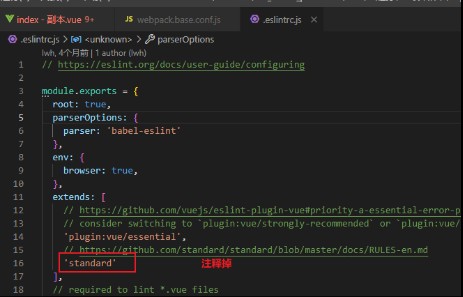
如下图 把红线部分去掉 但是 没有作用
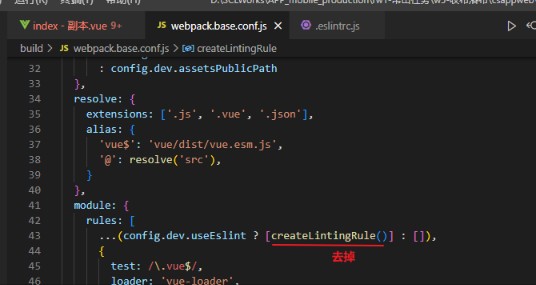
下图这个操作才有效
# vue3 将ESLint关闭
官方传送门 Vue CLI (opens new window)
module.exports = defineConfig({
  // 关闭语法的自动检测
  lintOnSave: false,
})
1
2
3
4
2
3
4